
Quick summary
A small business website looked fine, but only 35 of its 86 pages were in Google’s index. A week of technical SEO, fixing broken links, shrinking oversized images, tidying the site structure and correcting heading formatting, got every page indexed and search impressions up sevenfold. Clicks haven’t moved yet, because rankings depend on content and keywords, which is the next phase.
Introduction
A lot of people focus on the glamorous side of digital marketing. Going viral on TikTok, growing a YouTube channel, the things that get talked about. But the boring work behind the scenes can be just as important and just as effective, and technical SEO is a good example of that.
I’ve just spent a week on a client’s website fixing things nobody ever sees. No new content, no rewritten headlines, no keyword work. One week later, Google had indexed every page on the site, up from 35 to 86, and the site was getting seven times as many impressions in Google search.
Here’s what I found, what I fixed, what changed, and the one thing that didn’t. That last part matters, because I don’t want you to think you fix a few links and everything’s perfect.
The website that looked fine but wasn’t working
I won’t name the client, but they’re a small business in the travel and events sector. They’ve been going for 25 years and have offices in three locations.
Their website looks good. It’s well designed and clean, and anyone visiting it would say it’s absolutely fine. The problem was that it wasn’t bringing in any traffic.
Like most people, they’d assumed that because they had a website, Google could see it and it was available to anyone searching. That’s one of the most common assumptions I come across with small businesses, and it’s often wrong.
What a technical SEO check found under the bonnet
Technical SEO is the behind-the-scenes work that makes it possible for search engines to find, read and understand your website. It’s less about what your pages say and more about whether they can be reached and processed properly.
To check this, I used two tools. Screaming Frog is a crawler, which means it works through your site the way a search engine does and reports on every page, link and image it finds. Google Search Console is Google’s free tool that shows you how Google itself sees your site.
Two things stood out.
First, the site wasn’t fully indexed. Google’s index is its database of pages it can show in search results. (You can find out more in my article “How search engines work“). Only 35 of the site’s 86 pages were in it, about 40%. If a page isn’t in Google’s index, it can’t appear in Google’s search results, full stop. Google is clear that indexing isn’t guaranteed, and not every page it processes gets indexed.
Second, and related, there were plenty of technical problems that explained why:
- Broken links leading to pages that no longer existed
- Links pointing to redirected pages, some of which didn’t exist or created redirect loops
- Pages that were live on the site but not linked from any menu, so Google was finding them and getting confused
- A sitemap (the list of pages you give search engines) that didn’t match the pages actually live on the site
- Body text formatted as headings
- Images that were far too big, slowing the site down
Fix one: clearing out broken links and redirects
The first job was going through every broken link and fixing it, so nothing on the site led to a dead end.
That’s obviously better for visitors, but it matters for search engines too. Google discovers new pages mainly by following links from pages it already knows about. Give it a link to a dead end and it has nowhere to go, so the pages further along never get found or indexed.
Fix two: shrinking oversized images
Next were the images. I removed every image the site wasn’t actually using, then compressed the ones it was using so they were as small as possible while still looking sharp.
That meant taking images from around 2 megabytes down to roughly 100 to 150 kilobytes each. It’s a massive difference in how fast pages load, and in how much work the site has to do to display them. A faster site is more usable for people and easier for search engines to process.
Fix three: tidying up pages and site structure
Then there were the pages that were published but doing nothing. They weren’t in the menus and weren’t part of the site’s structure, but they were still live in the background.
I took those down and made sure every live page appeared properly in the menus, in a logical structure. That way visitors can browse through and find what they need, and search engines can understand where each page sits in the site’s hierarchy. With the structure cleaned up, the sitemap could finally match what was really on the site, which matters because a sitemap is one of the ways Google discovers pages.
Fix four: turning headings back into body text
The last fix was the formatting. On many pages, whole paragraphs of normal text had been set as heading 2 (H2). I changed them back to standard paragraph text.
I understand why people do this. Making text a heading increases the font size and makes it bolder, so it can look nicer on the page. But headings and body text do different jobs. Headings show how the information on a page is structured and broken down. Body text tells search engines, and screen readers, what the page actually contains.
When everything is a heading, those signals get muddled. The headings become long and confusing, and the page looks like it has structure but very little content. Google has said heading order matters more for accessibility than for rankings, but a page that’s hard to interpret doesn’t help anyone. If you want text to stand out, change its style in your website’s design settings rather than turning it into a heading.
The results after one week
A week after making these changes, all 86 pages on the site were indexed by Google. Going from 35 to 86 is nearly two and a half times as many pages that can now appear in search results.
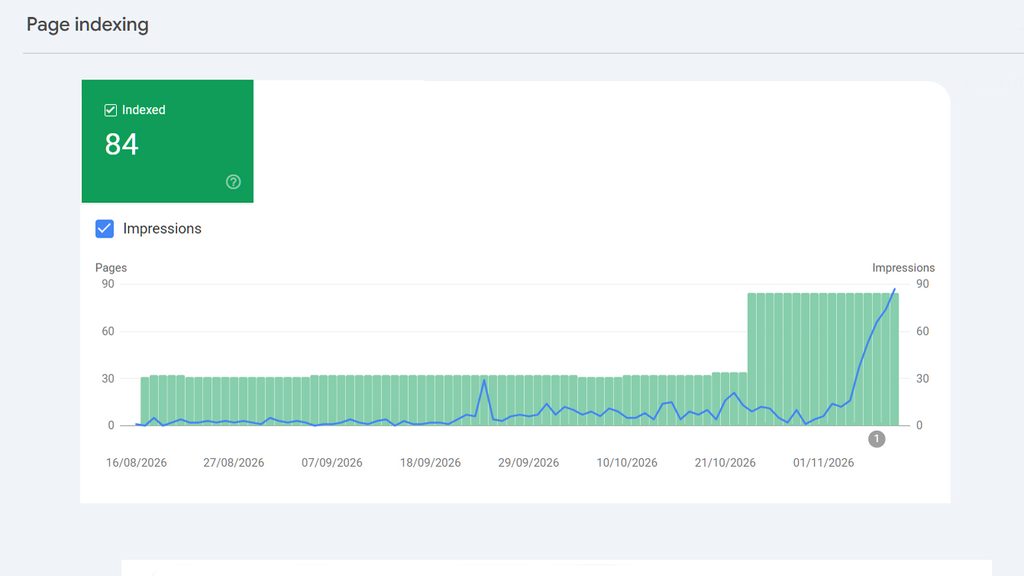
Search impressions, the number of times the site’s pages appeared in someone’s Google results, rose sevenfold. That’s an increase of more than 600% in a single week.
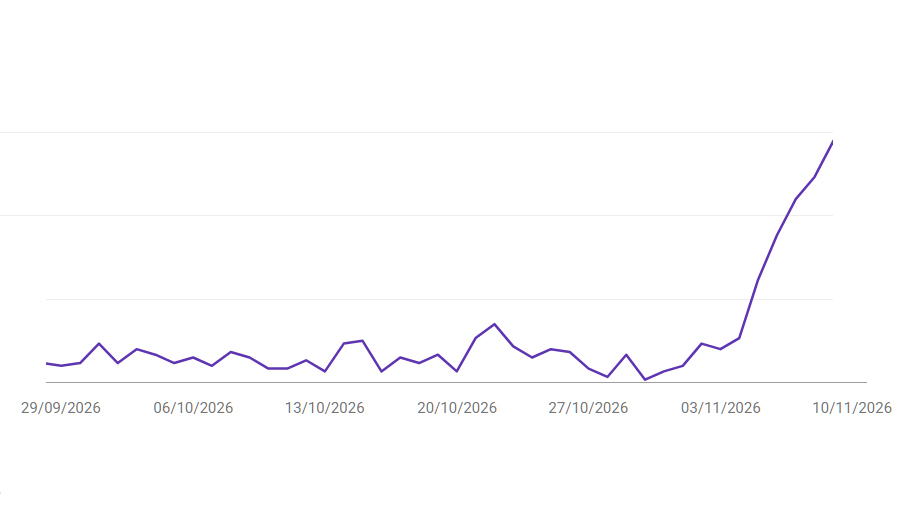
That’s from technical work alone. No new content, no changes to page titles, meta descriptions or the words on the page.
What didn’t change
I said I’d be honest. Clicks to the website are still low, with no real change yet. The site is appearing in far more searches, but it isn’t near the top of page one, so people aren’t clicking through.
That’s expected. Where you rank depends much more on on-page SEO: your keywords, your content, what you’re saying on each page and how you say it. That’s phase two of this project.
The important point is that we now have a solid platform. The whole site is indexed and starting to appear in search results. Now we can optimise it.
Does technical SEO alone improve rankings?
Not on its own. Technical SEO makes your pages eligible to appear in search and easier for Google to understand, but how high they rank depends mainly on the quality and relevance of your content.
Look under the bonnet before you rewrite your headlines
If your website isn’t getting the traffic you want, it’s tempting to go straight to headlines and keywords. Before you do, check the basics:
- Are your pages actually in Google’s index? Search Console will tell you.
- Are there problems you can’t see, like broken links or redirects that go nowhere?
- Are your images too heavy?
- Is your body text formatted as headings?
Fix those first. If the fundamental problems are still there, tweaking headings, meta titles and meta descriptions will move the needle very little.
So, is technical SEO boring? Very probably. Is it effective? Absolutely.